Author Archives: Admin

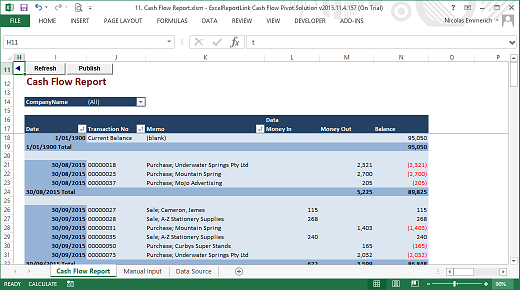
ExcelReportLink Cash Flow Pivot Solution

We are pleased to announce ExcelReportLink Cash Flow Pivot Solution has been officially released.

This addon to MYOB has been specially designed to provide the same Analyse Cash Flow function which was removed from MYOB AccountRight Live 2013 or higher.

CashFlowPivotReport

To find out more,

Visit : https://accountingaddons.com.au/excelreportlink-cash-flow-pivot-solution/

Jeff Stephenson
Managing Director | Solution Architect

DirectDebitsLink is now an approved MYOB Addon Solution

MYOB have now approved DirectDebitsLink as the first Banking MYOB Addon Solution. The approval process involved a review of the solution by MYOB’s developer team.

To view the listing click DirectDebitsLink – Standard Edition

This gives visibility to a free solution which gives both small and large Direct Debits users the ability to easily create a Direct Debits ABA file without the need to re-enter payment information into their banks direct debit system.

Jeff Stephenson
Managing Director
Accounting Addons

Goto DirectDebitsLink home for more info

Pricing Methodology

We give away functionality to solve the core accounting problems
Charge a low monthly fee for functionality that solves the complex problems
Assist you with high end consulting services at an hourly rate

MYOB compatability

Our solutions integrate with the following MYOB accounting products, editions and versions:

MYOB AccountRight Live
All editions including AccountRight Live Basics, AccountRight Live Standard, AccountRight Live Plus
Version 2019 and all earlier versions including Version 2013.

MYOB AccountRight Classic
All editions with the MYOB ODBC Driver including AccountRight Enterprise, AccountRight Premier and AccountRight Standard
All versions up to v19.9

Data Cleansing Process

Steps to cleanse an MYOB AccountRight Classic data file

  1. Contact us to discuss your data cleansing requirements.
    We will then provide an estimation
  2. If you choose to proceed then we will forward an invoice for 50% of the minimum expected amount. Upon notification of payment we will schedule in a time to perform the processing. Typically this will be over the week end.
  3. Optimise and backup your MYOB data file
  4. Click this link to open Dropbox
  5. Enter your Name and Email address
  6. At Subject enter [Your Company Name] MYOB Data file
  7. Select your zipped MYOB data file
  8. Select any supporting documents required to match records. ie a list of matching duplicates
  9. In the Notes field enter your MYOB Administrator Username and Password and confirm that the MYOB data file has been optimised. Also include any instructions on what you want us to do
  10. Click Send it
  11. Ensure that users do not make changes to MYOB during processing
  12. When processing is complete an email will be sent with a link to a zipped copy of your cleansed MYOB Data file.
  13. Download and unzip the MYOB Data file and make it the current version.
  14. Check that the MYOB data file appears OK.
  15. When OK advise users that they can log back onto MYOB.

BudgetLink – Specialised Functionality

BudgetLink – Specialised Functionality – Price on Application

Functionality that requires consulting to implement and may require some development depending on what is required.

  • Simultaneous MYOB Category and Job budgeting and reporting
  • Set up and monitor account ratios and KPI’s like Current and Debt to Equity ratio’s
  • Publishing Scripts – Published sets of reports and distributes to users.
  • Overnight Upload – Used if you have many or large data files or many users. Pulls data from from sources overnight so that reports are immediately available
  • Company Eliminations using Categories – Track and eliminate inter-company transactions using categories.
  • Data Archiving – Archive MYOB actual data to allow detailed reporting into historical years even when transactions are purged in MYOB.
  • Consolidate data files across different accounting systems
  • Quotes and Orders Version – Report in a profit and loss and balance sheet format. Combine with Actuals to create a forecast
  • 13 4 weekly period reporting
  • [4, 4, 5] weekly reporting periods
  • Cash flow reporting by Job
  • Benchmarking
  • Cash flow Statements and Forecasts – Split by Operating, Investing and Financing Activities
  • EBIT and EBITDA Reporting
  • Job Linked Customer Hierarchy – Report Profit and Loss by Job Linked Customer
  • Security – Setup users and restrict them from accessing selected reports and divisions (jobs)
  • Integration with MYOB EXO

Download BudgetLink for FREE

BudgetLink Home

Services

Bulk Deletion and Merging of inactive MYOB Records We provide a service where by we can identify inactive record either by the inactive status and or last sale date and then proceed to either delete or merge those inactive cards or items

Identify and Remove Duplicate Cards – We can start by providing a list of cards that are possible duplicates based on Postcode, Name and Address for you to match, and then automate the process of deleting or merging the duplicates